ESP32 Replacement Board
The recommended hardware: an ESP32 and an RS-485 transceiver that take the place of the AEH-W41H1
module on the A/C’s 4-pin connector and run the ESPHome firmware. This page is
the hardware side: the parts, the wiring for both boards, the pins to avoid and the staged
bring-up. The reasons behind each rule are in firmware/docs/16-esp32-board-notes.md.
Why replace the module
The stock modules die easily (static and handling) and are hard to buy in the EU. The A/C mainboard asks for no authentication on the bus, so a board that sends the same bytes is a module as far as the unit can tell. An ESP32 is also flashed and recovered over USB, where the stock module needs a clip on its flash chip.
A/C mainboard ── RS-485 (A/B) ── transceiver ── UART ── ESP32 ── Wi-Fi ── Home Assistant
Parts
About 5 EUR in total.
| Part | Pick | Notes |
|---|---|---|
| ESP32 board | an ESP32-C3 SuperMini, which is small enough to sit where the module did. A classic ESP32 dev board works too | powered from the port’s 5 V: the 5V pin on the SuperMini, VIN on a classic board |
| RS-485 transceiver | a 3.3 V part: MAX3485, SP3485 or SN65HVD75, with DE and RE tied together to one GPIO. A 3.3 V auto-direction TTL to RS-485 module also works, and the DE signal then goes nowhere | never a 5 V MAX485 module: its RO pin drives 5 V into the ESP32 and kills the RX pin |
| C3 only | a resistor of about 10 kΩ from DE (GPIO10) to GND | keeps a floating DE from jamming the bus at power-up |
| Wiring | a 4-pin lead to the A/C port, jumper wires | the port’s pinout is in Hardware and Wiring |
There are two ESP32-C3 SuperMini boards, and they need different board files. The plain SuperMini has a small blue LED on GPIO8. The SuperMini Plus has an RGB pixel there (a square white package) and usually an external antenna connector (board files).
Wiring
The pins are set in the board file, so there is nothing to edit when you switch boards.
| Signal | ESP32-C3 SuperMini | classic ESP32 | transceiver |
|---|---|---|---|
| TX | GPIO5 | GPIO19 | DI (auto-direction module: RXD) |
| RX | GPIO6 | GPIO18 | RO (auto-direction module: TXD) |
| DE | GPIO10 | GPIO4 | DE and RE tied (auto-direction module: not connected) |
| 3V3, GND | 3V3, GND | 3V3, GND | VCC, GND |
Both pin sets run on a live A/C. The C3 set is three plain GPIOs in a row on one header: no strapping pin (2, 8, 9), no USB (18, 19), no UART0 (20, 21).
Bus side:
| Transceiver or board | A/C 4-pin port |
|---|---|
| A | RS-485 A |
| B | RS-485 B |
| GND | GND |
| the ESP32’s 5V or VIN | 5 V |
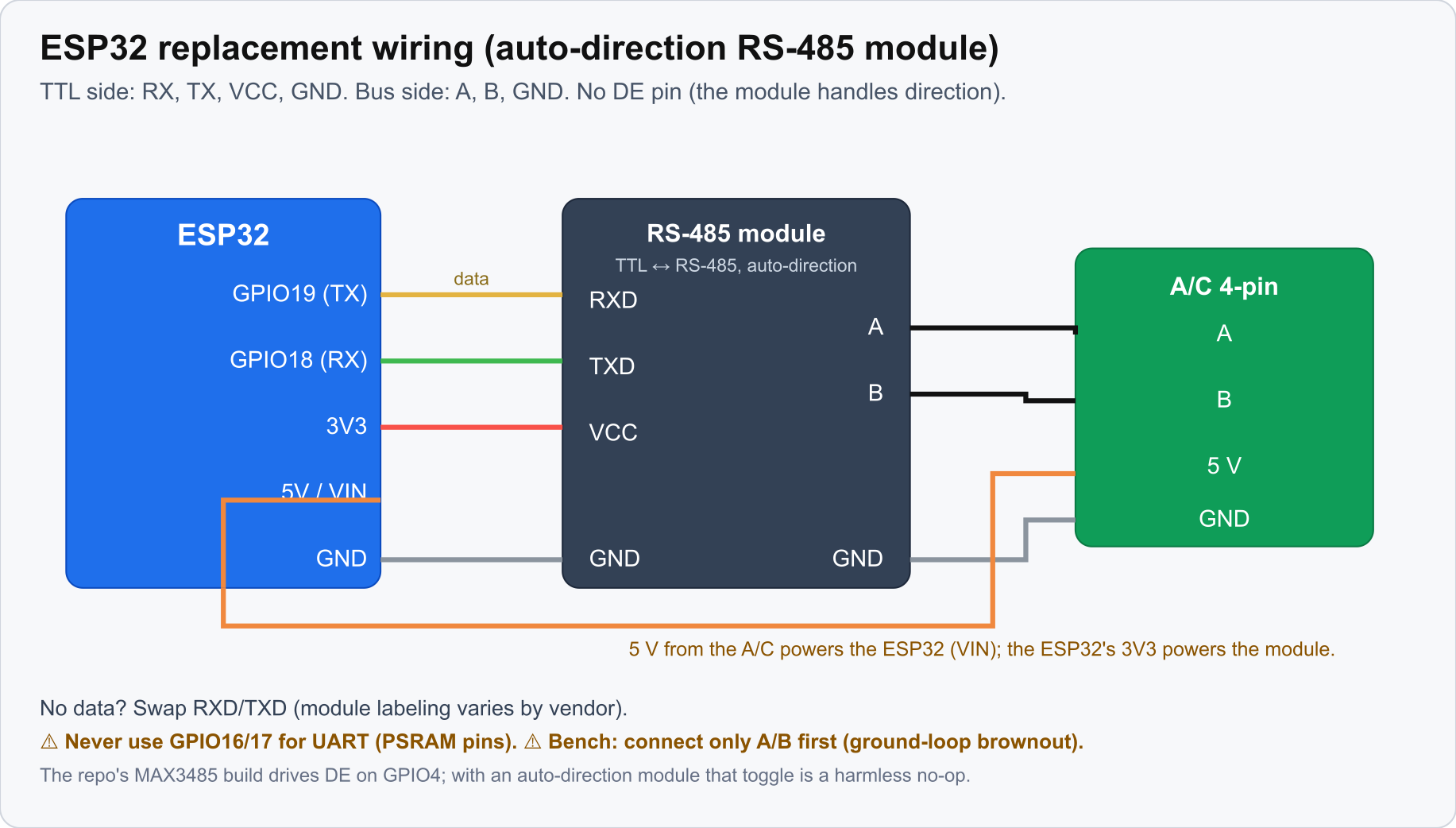
A classic ESP32, an auto-direction RS-485 module and the A/C’s 4-pin bus. The C3 SuperMini uses TX 5, RX 6, DE 10. No data? Swap RXD and TXD: vendor labels vary.
Pins and mistakes to avoid
- C3: never put the UART on GPIO18 or GPIO19. They are the USB data lines, and on the SuperMini that USB port is the only way to flash the board or see its console.
- C3: fit the 10 kΩ pulldown on DE (GPIO10). DE floats from power-on until the firmware
configures the pin, and a DE that drifts high puts a second driver on the A/C’s bus. It shows
as intermittent bus corruption, which does not look like a wiring fault. If firmware and wiring
disagree on the DE pin, the node sends and never hears a reply:
AC bus linkstays off. - Classic ESP32: never use GPIO16 or GPIO17 on a WROVER or D0WDQ6 module. They are bonded to the PSRAM die and dead as I/O, even with PSRAM disabled. TX on GPIO17 once cost a whole debugging session, because an internal loopback passes (it does not go through the pads). To prove the pins before wiring the transceiver, put a jumper from GPIO19 to GPIO18: RX has to follow TX.
- A brand-new board: erase the flash before the first flash (
dev.py erase esphome --port P, oresptool.py erase_flash). A vendor test image can leave a Wi-Fi configuration in NVS. Never erase a board that is already running: that throws away its Wi-Fi settings. - Ground loop. While the board is powered over USB, connect only A and B to the A/C. Joining the A/C’s mains-earthed ground to a laptop-earthed board browns it out (watchdog resets, flash read errors). GND and 5 V go on at stage 3, with the laptop unplugged.
Why the C3’s DE pin moved from GPIO7 to GPIO10, the DE release timing and the stale-NVS
diagnosis: firmware/docs/16-esp32-board-notes.md.
Staged bring-up
Never leave the A/C in an unknown state. Three stages, each with a clear pass.
- Bench, no A/C. Run the host tests, then flash the board and let it talk to the simulator
on a USB adapter (how). Pass: the
AC bus linksensor turns on and the climate entity fills in. - The real bus, on USB power. Take the module out and connect A and B only. Pass: the link comes up, and the indoor temperature, the mode and the compressor frequency match the unit. That proves reading. Then send one command.
- Powered from the connector. Unplug the laptop, connect 5 V and GND, close the unit.
python3 firmware/scripts/dev.py next esphome prints these stages with their warnings.
Both directions are proven on hardware: the mainboard accepts a board that is not Hisense’s, the link comes up with the device-type bytes learned from the A/C, and nodes drive A/Cs from Home Assistant this way.
Next
Install the tools and flash: Build Environment. A board that will not flash or boot: Recovery and Reflash.